
Google Ads Conversion Duplication on Shopify: How Double-Firing Pixels Inflate Your ROAS by 2x (2026 Fix Guide)
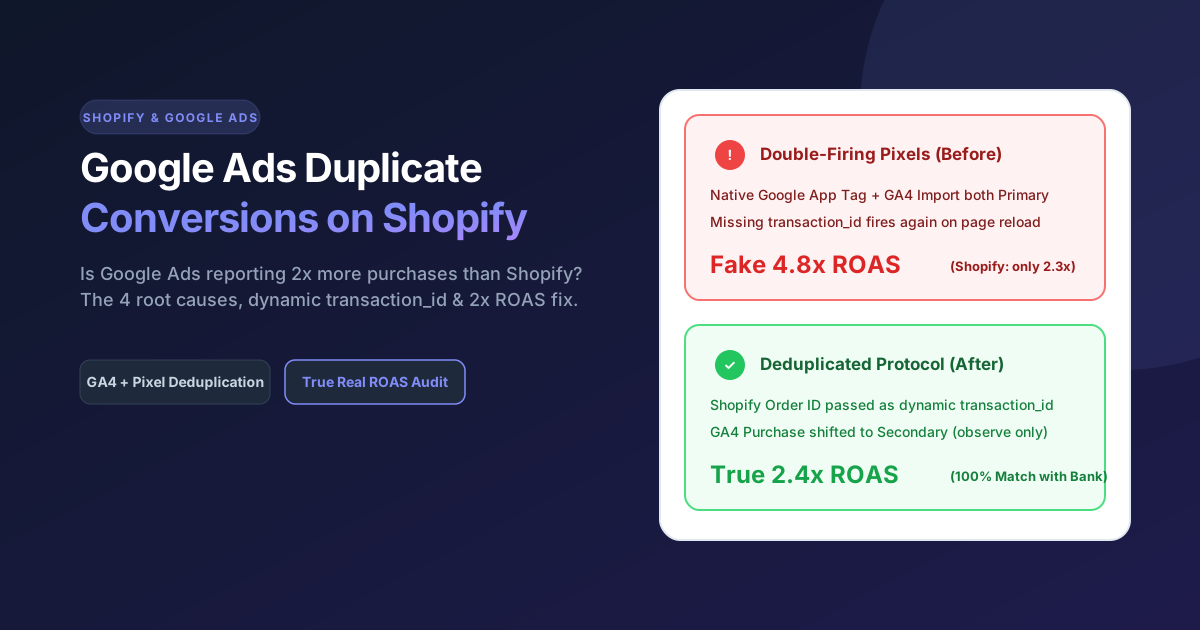
Google Ads double-counts Shopify purchases when two or more conversion actions are simultaneously set to "Primary" (Include in "Conversions" = Yes)—typically when the native Shopify Google & YouTube app tag fires alongside an imported GA4 purchase event or a hardcoded GTM snippet—or when your purchase tag lacks a dynamic transaction_id to deduplicate order status page reloads.
If your Google Ads dashboard claims a 4.2x ROAS and 80 purchases this week, while your Shopify admin shows only 41 actual orders, you do not have an attribution triumph—you have a Primary Conversion Duplication leak.
Across the Shopify and D2C ad accounts we inspect during our 58-Point Google Ads Diagnostic at PhotoPixc, conversion duplication is the single most destructive tracking defect we find. When Smart Bidding algorithms (Target ROAS, Maximize Conversion Value, and Performance Max) are fed phantom double-counted purchases, Google aggressively bids up on the exact clicks that triggered the duplicate firing—draining your daily budget while real store profit drops.
This step-by-step guide walks through how to verify if your Shopify store is double-counting purchases, the 4 technical root causes, and how to fix your setup cleanly in 2026.
Why Is Google Ads Counting Twice as Many Purchases as Shopify?
Direct Answer: Google Ads double-counts Shopify purchases when two or more conversion actions are simultaneously set to "Primary" (Include in "Conversions" = Yes)—typically when the native Shopify Google & YouTube app tag fires alongside an imported Google Analytics 4 (GA4) purchase event or a hardcoded Google Tag Manager (GTM) snippet—or when your purchase tag lacks a dynamic transaction_id to deduplicate order status page reloads (Google Ads Help: Minimize Duplicate Conversions).
When we run our Winter Skincare Google Ads & Checkout Funnels (where clean intent-led tracking delivered 112 verified purchases at a 4.95% conversion rate and $1.58 CPA), we enforce one strict rule before spending a dollar: one Primary Purchase truth source, zero secondary bleed.
The 4 Root Causes of Duplicate Conversions
Here are the 4 exact technical scenarios that cause a 2x inflated ROAS on Shopify:
| Duplication Cause | What Happens Under the Hood | Symptom in Google Ads | The Exact Fix |
|---|---|---|---|
| 1. Dual Primary Sources (App + GA4 Import) | Both the native Google & YouTube Shopify channel and an imported GA4 Purchase action are set to Primary. | Exactly 2.0 conversions recorded for almost every single paid order. | Demote the GA4 Purchase action from Primary to Secondary (Observe only). |
| 2. Button-Click + Thank-You Page Firing | An agency sets Add to Cart or Begin Checkout button clicks as a Primary conversion action alongside Purchase. | Conversion count is 3x to 8x higher than real orders; PMax optimizes for window shoppers. | Set all micro-events (Add to Cart, Begin Checkout, Page View) to Secondary. |
| 3. Missing Dynamic transaction_id | A custom Google Tag (gtag.js) or GTM tag fires on the /thank_you / Order Status page without passing Shopify's unique order ID. | Every time a buyer refreshes the tracking page on their phone to check shipping status, a new sale is logged. | Pass a dynamic transaction_id ({{ order.id }} or checkout.order_id) so Google automatically drops repeat loads. |
| 4. Legacy theme.liquid or Additional Scripts Ghosts | Old hardcoded AW-XXXXXXXXX snippets left behind in theme.liquid or deprecated Checkout Additional Scripts fire next to Shopify's Customer Events pixel. | Random 1.3x to 1.8x purchase inflation across desktop and accelerated checkouts (Shop Pay). | Remove legacy inline gtag snippets from theme files and migrate to a single Customer Events pixel. |
How Do You Audit Your Google Ads Account for Duplicate Conversions in 3 Minutes?
Direct Answer: You can detect duplicate conversions in under 3 minutes by navigating to Goals > Conversions > Summary inside Google Ads, segmenting your active campaigns by Conversion Action, and comparing the Conversions column against the All conv. column over a 30-day window.
Follow this 3-step audit checklist (the exact sequence we run inside Part 1 of our PhotoPixc 58-Point Store & Ad Diagnostic):
- Check the "Action Optimization" Column in Goals > Summary:
Open your Google Ads account and go to Goals > Conversions > Summary. Look under the Purchase category. If you see more than one row marked Primary (for example, Google Shopping App Purchase = Primary AND GA4 - purchase = Primary), your account is actively double-counting every Google-attributed sale. - Segment Campaign Reports by "Conversion Action":
Go to Campaigns, set your date range to the last 30 days, and click Segment > Conversions > Conversion action. Inspect your top-spending Search, Shopping, or Performance Max campaigns. If a single campaign shows 45 conversions from a direct Google tag and 42 conversions from a GA4 import—totaling 87 reported conversions on 45 actual orders—your Smart Bidding target is working off a 93% inflated ROAS. - Compare Repeat Rate (Conversions vs. Unique Order IDs):
Check the Repeat rate column inside your conversion action details. For a standard purchase action with a valid transaction_id, repeat rate should sit near 1.00 to 1.05. If your repeat rate is 1.35+, customers refreshing your Shopify Order Status page are triggering duplicate conversion hits.
Does Changing the "Count" Setting from "Every" to "One" Fix Duplicate Purchases?
Direct Answer: No—changing the Google Ads conversion Count setting from "Every" to "One" is designed for lead generation forms, not e-commerce purchases, and is not the recommended fix for duplicate e-commerce transactions (Google Ads Help: About Transaction ID and the Count Setting).
According to Google's Official Transaction ID Documentation (last checked October 2026), there is a critical difference between the two settings:
- Setting Count to "One" (For Leads Only): Counts only one conversion per ad click. If a real customer clicks your Google Shopping ad, buys a starter kit today, and comes back two days later to buy a refill from that same ad click, setting Count to "One" discards the second legitimate purchase.
- Keeping Count on "Every" + Adding transaction_id (Required for E-Commerce): Tracks every distinct purchase a customer makes after an ad click while automatically deduplicating any repeat firing that carries the exact same order confirmation number (transaction_id).
Step-by-Step Fix: How to Eliminate Duplicate Conversions on Shopify (2026)
Direct Answer: To permanently stop duplicate purchase conversions on Shopify, choose a single Primary purchase conversion action (typically the direct Google tag via the Google & YouTube app or a verified GTM Customer Event), set all other purchase and micro-conversion trackers to Secondary, and verify that a dynamic transaction_id variable is passed on every order confirmation.
Step 1: Demote Duplicate Purchase Trackers to "Secondary"
- In Google Ads, navigate to Goals > Conversions > Summary.
- Keep your primary direct tag (such as Google Shopping App Purchase or your verified server-side/GTM purchase tag) set to Primary.
- Click Edit goal on any duplicate purchase actions (such as imported GA4 web - purchase or legacy tags) and change their setting from Primary to Secondary (observe only).
- Ensure all non-purchase events (Add to cart, Begin checkout, Contact, Page view) are also set to Secondary so they never pollute the primary Conversions and Conv. value columns used by Smart Bidding.
Step 2: Purge Legacy Snippets from Shopify Theme & Checkout
- In your Shopify Admin, go to Online Store > Themes > Edit code and open
theme.liquid. - Search for
AW-orgtag('event', 'conversion'. If a previous freelancer pasted a manual conversion event inside the global header, remove the conversion event (while keeping the base Google tag clean if not managed via the app). - Go to Settings > Checkout and check whether legacy Additional scripts are still running alongside Settings > Customer events custom pixels. Running both simultaneously is a frequent cause of double-counted Shop Pay and PayPal orders.
Step 3: Verify Dynamic transaction_id Deduplication
If you use the official Shopify Google & YouTube app, Shopify automatically injects a unique transaction_id on purchase events. However, if you use a custom Google Tag (gtag.js) or Google Tag Manager (GTM) container, you must pass the order ID dynamically:
// Example: Dynamic transaction_id inside gtag.js purchase event
gtag('event', 'conversion', {
  'send_to': 'AW-CONVERSION_ID/CONVERSION_LABEL',
  'value': 64.00,
  'currency': 'USD',
  'transaction_id': '{{ order.id }}' // Must be dynamic per order, never a static string
});
Per Google's Tag Manager Guidelines, never pass a static string in the transaction_id field—doing so causes Google Ads to treat subsequent real orders from different buyers as duplicates and drop them.
Step 4: Protect Your Smart Bidding Campaigns During the Reset
When you fix a 2x conversion duplication bug, your reported conversion volume and ROAS in Google Ads will immediately drop by 50% to reflect reality. If you are running Target ROAS (tROAS) or Target CPA (tCPA), adjust your bidding targets downward at the same time (or apply a short Data Exclusion window if a broken tag spiked conversions for a few days) so Google does not throttle your impression share while recalibrating to real checkout data.
Sources & Official References
- Google Ads Help: Minimize Duplicate Conversions with Transaction IDs
- Google Ads Help: About the Conversion Count Setting (Every vs. One)
- Shopify Help Center: Setting up the Google & YouTube Channel
All Google Ads and Shopify documentation was verified in October 2026. Keep in mind that Shopify deprecated Checkout Additional Scripts in favor of Customer Events pixels in 2025–2026.

Written by ABS Jony
Founder & Creative Growth Director at PhotoPixc. Designing high-converting e-commerce listings and managing profitable paid media campaigns since 2016. Verified on LinkedIn and Top Rated on Upwork & Fiverr.
Have a question about this guide? Get in touch directly.