
High ACOS on Amazon? Why It’s Usually a Creative Problem, Not a Bidding Problem
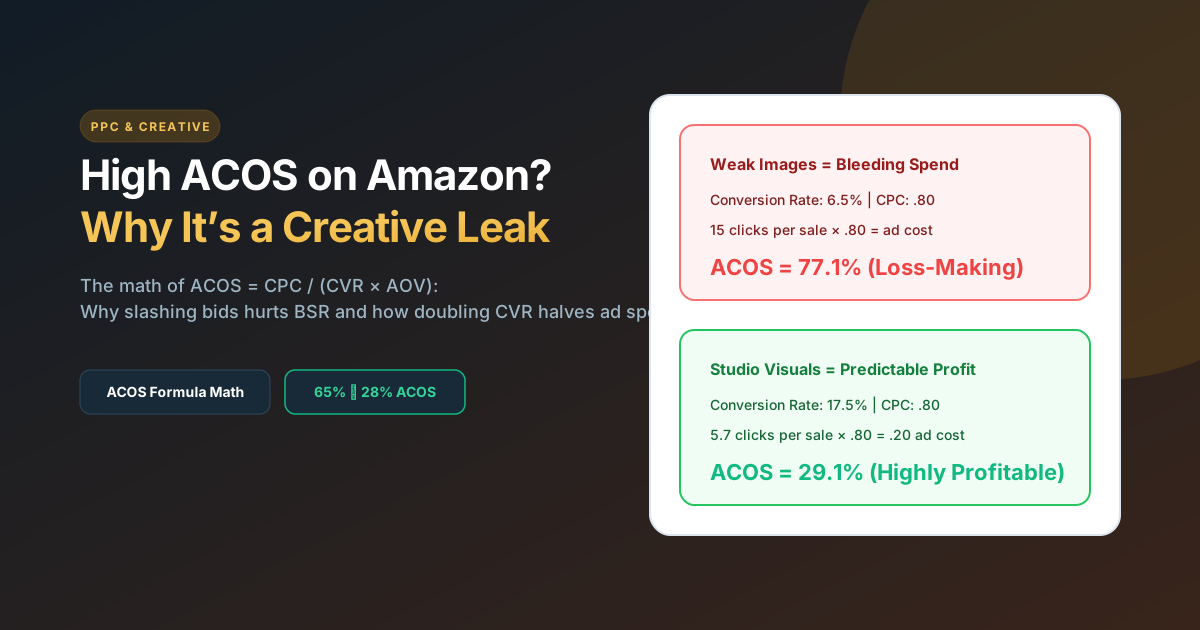
The Core Truth: When Amazon Advertising Cost of Sale (ACOS) climbs to 50% or 80%, sellers immediately blame their PPC bids, negative keywords, or campaign structure. But mathematically, ACOS = CPC / (Conversion Rate x Average Order Value). If your ad click-through rate (CTR) is solid but your listing conversion rate sits at 6% instead of the 14% category benchmark, slashing bids only kills your sales volume and BSR rank. Upgrading your visual assets—infographics, comparison tables, and A+ Content—cuts your ACOS in half without touching a single keyword bid.
The ACOS mathematical formula explained
Most sellers think of ACOS simply as Ad Spend / Ad Sales. While accurate on paper, that surface calculation hides what is actually controlling your profitability.
When expanded into core performance drivers:
Notice what controls this equation:
- Cost Per Click (CPC): Dictated by market competition and keyword auction dynamics. On competitive terms, CPCs are largely fixed.
- Average Order Value (AOV): Determined by your product pricing and bundle offerings.
- Conversion Rate (CVR): Controlled 100% by your product listing design, images, reviews, and copy.
If your CPC is .50 and your product sells for , a listing converting at 5% results in a disastrous 100% ACOS. Double that conversion rate to 15% with high-converting Amazon listing infographics, and your ACOS drops to a highly profitable 33% at the exact same .50 click cost!
The bid-lowering trap: Why slashing bids hurts BSR
When ACOS climbs into unprofitable territory, the standard PPC agency playbook is to lower keyword bids from .80 to zsh.90.
Here is what actually happens when you slash bids:
- Your ads fall from top-of-search placements down to bottom-of-page or competitor product carousels.
- Lower placement quality delivers lower-intent clicks with even worse conversion rates.
- Total daily sales drop. Because Amazon’s organic ranking algorithm (A9) calculates Best Sellers Rank (BSR) based on 24-hour sales velocity, your organic keywords begin sliding down the rankings.
Lowering bids treats the symptom, not the cause. You cannot bid your way out of a poor product presentation.
| Listing Scenario | CVR | Avg CPC | Price | Calculated ACOS | Net Profit Status |
|---|---|---|---|---|---|
| Unoptimized Stock Images | 6.0% | .80 | .00 | 85.7% | Severe Loss (-/sale) |
| Standard Freelancer Visuals | 9.5% | .80 | .00 | 54.1% | Break-even / High ACOS |
| Full Studio Gallery + A+ Content | 16.0% | .80 | .00 | 32.1% | Highly Profitable (+/sale) |
5 Creative defects that destroy Amazon ad profitability
1. Infographic Copy Unreadable on Mobile
Over 70% of Amazon Sponsored Products ad clicks originate on smartphones. When graphic designers design on 27-inch monitors, they cram 8 lines of 12pt text onto a product infographic. On mobile, that text turns into illegible gray smudges. Shoppers scroll past without understanding your product’s value.
The Fix: Limit each secondary infographic to one main idea with large, bold 32pt+ typography and high-contrast callout icons.
2. The “Wall of Text” Syndrome
Shoppers do not read 500-word product descriptions. If your listing lacks visual A+ Content comparison charts and exploded 3D feature breakdowns, buyers get overwhelmed and bounce to a competitor listing in the sponsored carousel.
3. Ignoring Competitor 1-Star Review Themes
Before launching paid ads, read the 1-star and 2-star reviews of your top 3 competitors. What are buyers complaining about? “Broke after 2 weeks”, “Too small for my sink”, “Instructions in broken English”.
If your listing images fail to visually address those exact fears right up front, shoppers carry those anxieties to checkout and abandon their cart.
4. Weak Hero Image CTR vs Search Rivals
If your main image doesn’t dominate the search results grid with perfect lighting, 85%+ frame fill, and clear product scale, your Click-Through Rate drops. Amazon algorithm penalizes listings with low CTR by forcing you to bid higher to maintain top-of-search impressions.
5. Missing Brand Story Cross-Selling
If an ad shopper clicks your ASIN looking for a specific size, but needs a different model, having an interactive Amazon Brand Store or A+ Brand Story carousel allows them to discover your complementary products rather than leaving your brand ecosystem entirely.
The 3-minute PPC vs Creative diagnostic test
Use this diagnostic framework inside Seller Central:
- Is your CTR < 0.3%? This is a Main Image & Title problem. Shoppers are seeing your ad in search results but choosing competitors instead. Re-shoot your main image with higher contrast and 85% fill.
- Is your CTR > 0.5% but CVR < 8%? This is a Listing Creative & Product Page problem. Your ads are targeting the right shoppers, but your gallery images and A+ Content fail to convince them to buy.
- Is your CVR > 15% but ACOS is still high? This is a Bidding / Keyword Matching problem. Your product converts well, but you are bidding on broad search terms that carry excessive CPCs. Narrow your match types to exact and phrase.
Is your Amazon ad budget bleeding from low conversion rates?
Send us your ASIN. Founder ABS Jony will record a free 5-minute video auditing your listing images, A+ content, and conversion leaks.
Frequently Asked Questions
What is considered a good ACOS on Amazon?
A “good” ACOS depends on your product profit margins. For established products aiming for profitability, target an ACOS between 20% and 30%. For product launches or aggressive market share acquisition, a break-even ACOS equal to your product gross margin (typically 35%–45%) is common.
How do listing images affect Amazon ACOS?
Listing images directly dictate your conversion rate. Because ACOS is mathematically tied to conversion rate, doubling your conversion rate with clear, benefit-driven infographics automatically halves your advertising cost per sale without changing your PPC bids.
Should I lower bids if my ACOS is too high?
Only after checking your conversion rate. If your conversion rate is below 10%, lowering bids will decrease total sales velocity and harm your organic rank. Fix your visual assets first to raise conversion rates, then optimize bids on non-converting search terms.
What conversion rate should I aim for on Amazon FBA?
The Amazon marketplace average conversion rate across all categories is approximately 10% to 15% (substantially higher than Shopify’s 1.5% due to Prime trust). Top-tier private label brands with custom photography and Premium A+ Content regularly exceed 20% to 25% CVR.
Related guides: Read our breakdown of Listing Image Costs, review technical specs in Product Image Requirements, or explore our Amazon Ads Management Service.