
Amazon Storefront Banner Dimensions & Mobile Safe-Zones: The 2026 Cheat Sheet
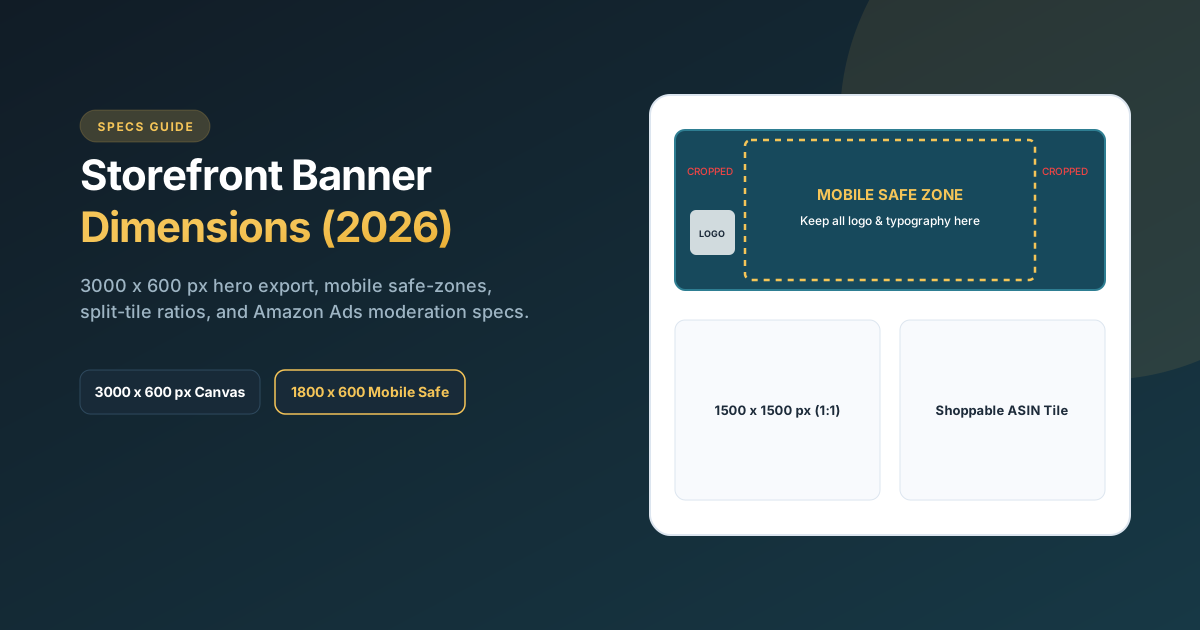
Quick Specs: The ideal size for an Amazon Brand Store header banner is 3000 x 600 pixels (minimum 1200 x 200 px, 5:1 or 16:9 ratio depending on layout), with file size under 5 MB in JPEG or PNG. On mobile screens, Amazon automatically scales and crops the left and right outer edges and places the store logo over the lower-left corner. Always restrict your headline copy, brand typography, and hero product focus to the central 1800 x 600 px mobile safe zone to prevent critical messaging from being clipped.
Amazon Storefront dimension matrix at a glance
Amazon Brand Stores use a modular grid system consisting of header banners, full-width feature sections, and multi-column split tiles. Here are the exact pixel dimensions to design in your graphic software (Photoshop, Illustrator, or Figma):
| Storefront Element | Recommended Export Size | Min. Resolution / Aspect Ratio |
|---|---|---|
| Hero Header Banner | 3000 x 600 px | Min. 1200 x 200 px (Aspect ratio ~5:1) |
| Full-Width Image Tile | 3000 x 1500 px | Aspect ratio 2:1 (Landscape) |
| Medium Split Tile (2 Columns) | 1500 x 1500 px | Aspect ratio 1:1 (Square) |
| Small Split Tile (4 Columns) | 750 x 750 px | Aspect ratio 1:1 (Square) |
| Shoppable Image Tile | 2400 x 1600 px | Aspect ratio 3:2 (Clickable interactive ASIN pins) |
| Store Video Module | 1920 x 1080 px (Full HD) | 16:9 widescreen, under 100 MB, MP4 format |
| Brand Logo Tile | 600 x 600 px | 1:1 square, transparent PNG or white background |
The mobile safe-zone rule explained
Over 70% of shopper clicks to an Amazon Brand Store originate on mobile phones and the Amazon Shopping app. Designing a banner that looks pristine on desktop but cuts off key copy on mobile is the number one cause of poor storefront conversion rates.
When Amazon renders your 3000 x 600 px hero banner on mobile:
- Horizontal Cropping: The left ~600 px and right ~600 px of the canvas are partially hidden depending on screen width.
- Logo Occlusion: Amazon pins your square brand logo and navigation menu directly onto the bottom-left area of the header. Any typography placed on the left edge will be completely obscured.
Studio Recommendation: Center all primary logos, taglines, and focal graphics within the central 1800 x 600 px safe zone. Use the outer 600 pixels on both sides for background texture, lifestyle ambiance, or seamless gradient extensions.
Tile sizes: Full-width, split, and shoppable modules
1. Full-Width Feature Banners (3000 x 1500 px)
Ideal for collection introductions (e.g., “Shop Summer Skincare Collection”). Because this tile spans the full container width without border margins, it delivers an immersive editorial look.
2. Split Square Tiles (1500 x 1500 px)
Split tiles sit side-by-side on desktop (2 columns) and stack vertically on mobile. Use these for category navigation links (e.g., Left Tile: “Serums”, Right Tile: “Moisturizers”) that route shoppers directly to dedicated subpages.
3. Shoppable Image Modules (Interactive Pins)
Shoppable images feature interactive circular product dots that reveal product details, star ratings, Prime badges, and one-click “Add to Cart” functionality when tapped. Always design clean lifestyle photos without heavy text so product pins remain legible.
Video header and background specs
Video in Amazon Brand Stores dramatically increases dwell time and reduces bounce rates:
- Format: MP4 or MOV encoded with H.264 video and AAC audio.
- Aspect Ratio: Strictly 16:9 (1920 x 1080 px). Vertical 9:16 videos are not supported in standard store modules.
- Autoplay Behavior: Store background videos autoplay on mute in a continuous loop. Add burned-in captions if dialogue or spoken claims are essential.
- Duration: Keep background videos between 6 and 20 seconds for seamless looping without jarring cuts.
5 Moderation mistakes that delay Amazon store approval
Unlike listing updates, every Amazon Brand Store submission undergoes manual or semi-automated review by Amazon’s moderation team (typically taking 24 to 72 hours). Avoid these common rejection reasons:
- Misspellings or Punctuation Errors: Amazon strictly rejects headers containing typos or excessive capitalization (e.g., “BUY NOW BEST SELLER!!!”).
- Claims Without Substantiation: Words like “Best-selling”, “#1 Rated”, or “Clinically Proven” require a source citation date and credential printed directly in the graphic.
- External Contact Information: Phone numbers, website URLs (e.g., yourstore.com), or social media handles are strictly prohibited.
- Low-Resolution or Pixelated Imagery: Assets uploaded under 1200 px width that stretch across large desktop viewports will be rejected for quality reasons.
- Call-to-Action Misleading Language: Avoid fake buttons that do not lead anywhere. All CTA text (“Shop the Range”) must map directly to an active ASIN grid or subpage.
Driving Sponsored Brands traffic to your store for maximum ROAS
Amazon Brand Stores become 10x more valuable when paired with Amazon Sponsored Brands ads. Rather than sending paid ad traffic to a single product listing, forward-thinking brands direct ad clicks to their custom Brand Store homepage or a curated seasonal category subpage.
Data from Amazon Ads shows that sending Sponsored Brands traffic to a dedicated Brand Store lifts Return on Ad Spend (ROAS) by up to 29% compared to sending traffic to a generic search product list. Review our case study: Lumina Brand Store Case Study.
Want a high-converting, mobile-optimized Amazon Brand Store?
We design custom Brand Stores built around your catalog architecture, mobile safe-zones, and Sponsored Brands advertising goals.
Frequently Asked Questions
What is the best size for an Amazon storefront banner?
The industry standard export size is 3000 x 600 pixels (or 3000 x 1200 pixels for tall headers) at 72–300 DPI, saved as a high-quality JPEG under 5 MB. This ensures crisp rendering on 4K retina displays while meeting Amazon upload limits.
Why is my Amazon storefront banner cropped on mobile?
Amazon dynamically adapts your store header across varying mobile device screens. The left and right 20% of your desktop image are cropped horizontally on narrow screens, and the brand logo tile overlays the lower-left corner. Keeping critical graphics inside the center 1800 x 600 px safe zone solves this problem.
Can you put text on an Amazon brand store header banner?
Yes, unlike main product images, Amazon permits text, brand taglines, and promotional slogans on Brand Store headers. However, the text must be free of grammatical errors, substantiated if claiming awards, and centered within the safe zone.
How long does Amazon take to review and publish a Brand Store?
Amazon moderation typically approves Brand Store drafts within 24 to 72 hours. You can schedule publishing dates in advance to coordinate with product launches or seasonal holidays.
Related guides: Discover proven layouts in our Amazon Brand Store Examples Guide, check technical image rules in Product Image Requirements, or review our Pricing Page.